书生大模型实战营-MindSearch CPU-only 版部署
本节任务要点
- 按照教程,将 MindSearch 部署到 HuggingFace 并美化 Gradio 的界面,并提供截图和 Hugging Face 的Space的链接。
实践流程
随着硅基流动提供了免费的 InternLM2.5-7B-Chat 服务(免费的 InternLM2.5-7B-Chat 真的很香),MindSearch 的部署与使用也就迎来了纯 CPU 版本,进一步降低了部署门槛。那就让我们来一起看看如何使用硅基流动的 API 来部署 MindSearch 吧。
创建开发机 & 环境配置
打开codespace主页,选择blank template。浏览器会自动在新的页面打开一个web版的vscode。
接下来的操作就和我们使用vscode基本没差别了。
然后我们新建一个目录用于存放 MindSearch 的相关代码,并把 MindSearch 仓库 clone 下来。在终端中运行下面的命令:
mkdir -p /workspaces/mindsearchcd /workspaces/mindsearchgit clone https://github.com/InternLM/MindSearch.gitcd MindSearch && git checkout b832275 && cd ..接下来,我们创建一个 conda 环境来安装相关依赖。
# 创建环境conda create -n mindsearch python=3.10 -y# 激活环境conda activate mindsearch# requirements.txt 加上 class_registry==2.1.2# 安装依赖pip install -r /workspaces/mindsearch/MindSearch/requirements.txt获取硅基流动 API Key
因为要使用硅基流动的 API Key,所以接下来便是注册并获取 API Key 了。
首先,我们打开 https://account.siliconflow.cn/login 来注册硅基流动的账号(如果注册过,则直接登录即可)。
在完成注册后,打开 https://cloud.siliconflow.cn/account/ak 来准备 API Key。首先创建新 API 密钥,然后点击密钥进行复制,以备后续使用。
启动 MindSearch
启动后端
由于硅基流动 API 的相关配置已经集成在了 MindSearch 中,所以我们可以直接执行下面的代码来启动 MindSearch 的后端。
export SILICON_API_KEY=第二步中复制的密钥conda activate mindsearchcd /workspaces/mindsearch/MindSearchpython -m mindsearch.app --lang cn --model_format internlm_silicon --search_engine DuckDuckGoSearch启动前端
在后端启动完成后,我们打开新终端运行如下命令来启动 MindSearch 的前端。
conda activate mindsearchcd /workspaces/mindsearch/MindSearchpython frontend/mindsearch_gradio.py简单问一下a股相关情况
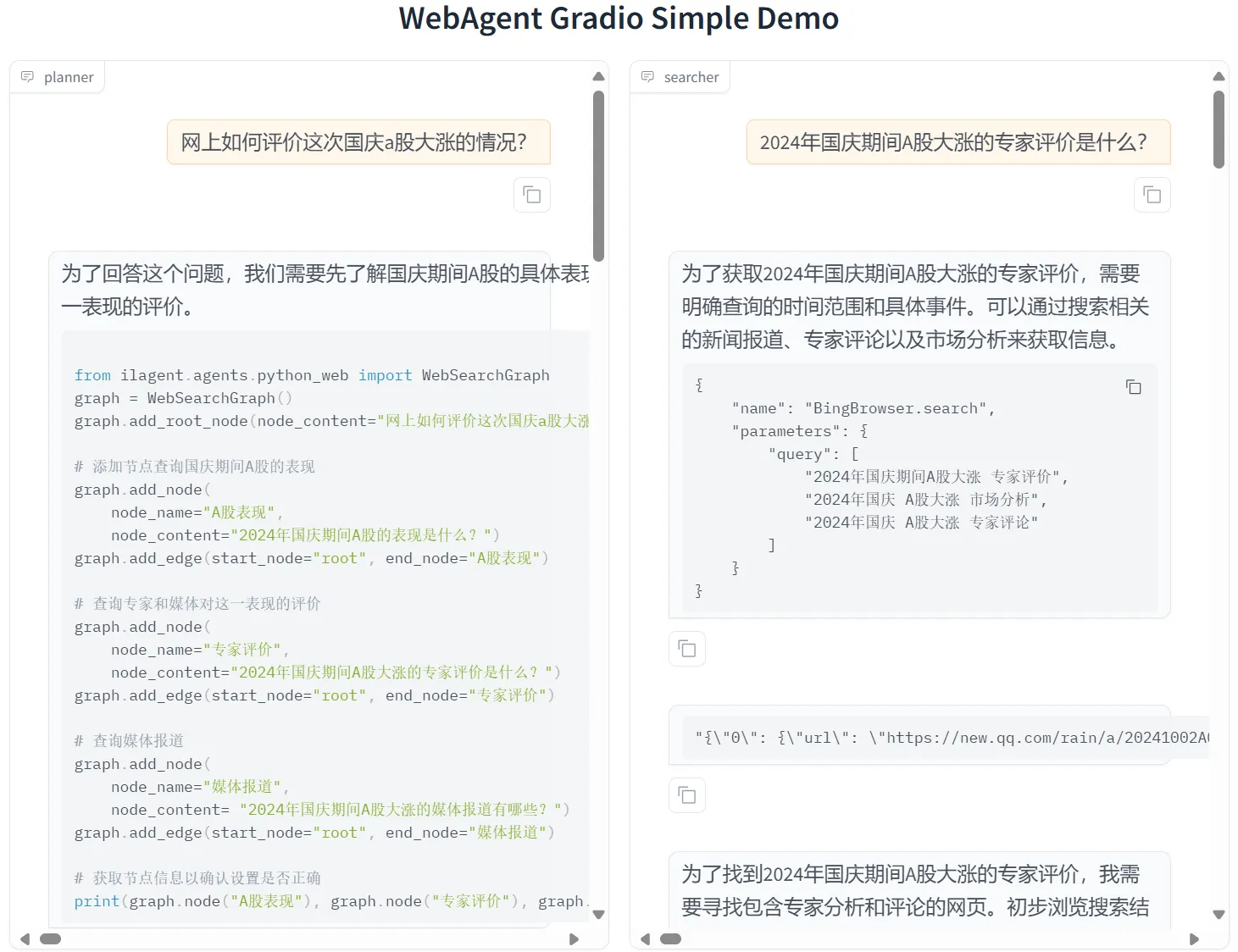
回复
2024年国庆期间,A股市场表现异常强劲,创下了多项历史纪录。这一现象引发了广泛关注和深入分析,包括专家、媒体以及投资者的观点。以下是对这一事件的详细分析:
### 市场表现
1. **指数创新高**: - 2024年9月30日,即国庆节前的最后一个交易日,上证指数 和深证成指均创下年内新高。上证指数突破3300点关口,深证 成指则创下1996年以来最大的单日涨幅记录[[0]][[2]]。 - 当天沪深两市的总成交额达到2.6万亿人民币(约合3630亿 美元),刷新了历史纪录[[0]]。 - 上证综指大涨8.06%,收于3336.5点;深证成指狂涨10.67% ,收于10,529.76点;创业板指的涨幅最高达15.36%且收于 2175.09点[[0]]。
2. **行业表现**: - 半导体板块大幅飙涨;电力设备股涨幅靠前;房企和消费类 股也先行看涨;银行股因早盘逆势下挫、收盘前涨幅垫底[[0]]。 - A股在国庆节后的第一个交易日通常会迎来反弹[[6]][[9]]。
3. **政策影响**: 中国政府在国庆前夕连续推出一系列景气刺激政策组合拳(如 降准降息、放水1万亿人民币等)以提振股市和房市[[0]][[9]]。 这些政策短期内有效拉抬了股市情绪和交易活跃度[[11]][[13]]。
4. **投资者情绪与行为**: A股市场的暴涨带动了投资者的乐观情绪提升至高点,许多投资 者纷纷入市或加仓股票以期获得收益[[12]][[13]]。例如, 部分券商甚至安排值班以应对开户热潮的到来[[12]].
### 专家评价
多位专家对此次A股大涨进行了分析和评价:
1. **高盛研究部首席中国股票策略师刘劲津**认为经济情势改善有望推动企业盈利回升且因A股估值处于历史低位而维持对A股的“高配”立场 [[23]].
2. **招商证券指出a股国庆节前后市场表现有一定的“日历效应”
3. **光大证券表示大消费板块在节假日后的市场表现通常较为强劲 [[24]].
4.外资机构普遍认为当前是加仓中国股票的好时机并预计政策连续发力将推动市场在第四季度继续上行 [[17]][[20]].此外央行资产互换举措为资本市场带来流动性支持也是此次股市大涨的重要原因之一 [[20]].
5.尽管股市大涨带来了积极的市场情绪和投资机会但专家也提醒投资者要保持理性态度并注意风险管理如三年来父母的账户虽然回本了3个账户但仍有较高的投资风险存在及分析师建议投资者要笑不露齿地应对市场的波动性等观点都体现了对市场的审慎态度和对长期投资的重视 [[16]][[25]]
### 媒体报道
多家媒体对此事件进行了详细报道:
1.《中国a股“贺国庆”创史上最高》报道称北京当局祭出一系列景气刺激政策导致A股指数连续数日大涨并在9月30日刷新单日成交额史上最高纪录 {{26}}.
2.《见证历史创业板指单日大涨10%!》指出创业板指单日大涨超过10%带动市值一周增加10万亿元人民币 {{27}}.
3.《澎湃新闻 | A stock market rally in China_澎湃新闻》提到行业预测大消费板块十一假期预期提振整体领涨且假期后全行业普涨大消费板块内部分化明显 {{40}}.
综上所述,2024年国庆期间A股指数表现出强劲上涨趋势主要受政策利好的推动以及投资者乐观情绪的影响但长期效果仍有待观察同时专家的分析和媒体的报道也为理解这一现象提供了多角度视角部署到 HuggingFace Space
最后,我们来将 MindSearch 部署到 HuggingFace Space。
我们首先打开 https://huggingface.co/spaces ,并点击 Create new Space。
在输入 Space name 并选择 License 后,选择配置:
gradio、blank、CPU basic 2 vCPU 16GB Free
然后,我们进入 Settings,配置硅基流动的 API Key。
选择 New secrets,name 一栏输入 SILICON_API_KEY,value 一栏输入你的 API Key 的内容。
最后,我们先新建一个目录,准备提交到 HuggingFace Space 的全部文件。
# 创建新目录mkdir -p /workspaces/mindsearch/mindsearch_deploy# 准备复制文件cd /workspaces/mindsearchcp -r /workspaces/mindsearch/MindSearch/mindsearch /workspaces/mindsearch/mindsearch_deploycp /workspaces/mindsearch/MindSearch/requirements.txt /workspaces/mindsearch/mindsearch_deploy# 创建 app.py 作为程序入口touch /workspaces/mindsearch/mindsearch_deploy/app.py其中,app.py 的内容如下:
import jsonimport os
import gradio as grimport requestsfrom lagent.schema import AgentStatusCode
os.system("python -m mindsearch.app --lang cn --model_format internlm_silicon &")
PLANNER_HISTORY = []SEARCHER_HISTORY = []
def rst_mem(history_planner: list, history_searcher: list): ''' Reset the chatbot memory. ''' history_planner = [] history_searcher = [] if PLANNER_HISTORY: PLANNER_HISTORY.clear() return history_planner, history_searcher
def format_response(gr_history, agent_return): if agent_return['state'] in [ AgentStatusCode.STREAM_ING, AgentStatusCode.ANSWER_ING ]: gr_history[-1][1] = agent_return['response'] elif agent_return['state'] == AgentStatusCode.PLUGIN_START: thought = gr_history[-1][1].split('```')[0] if agent_return['response'].startswith('```'): gr_history[-1][1] = thought + '\n' + agent_return['response'] elif agent_return['state'] == AgentStatusCode.PLUGIN_END: thought = gr_history[-1][1].split('```')[0] if isinstance(agent_return['response'], dict): gr_history[-1][ 1] = thought + '\n' + f'```json\n{json.dumps(agent_return["response"], ensure_ascii=False, indent=4)}\n```' # noqa: E501 elif agent_return['state'] == AgentStatusCode.PLUGIN_RETURN: assert agent_return['inner_steps'][-1]['role'] == 'environment' item = agent_return['inner_steps'][-1] gr_history.append([ None, f"```json\n{json.dumps(item['content'], ensure_ascii=False, indent=4)}\n```" ]) gr_history.append([None, '']) return
def predict(history_planner, history_searcher):
def streaming(raw_response): for chunk in raw_response.iter_lines(chunk_size=8192, decode_unicode=False, delimiter=b'\n'): if chunk: decoded = chunk.decode('utf-8') if decoded == '\r': continue if decoded[:6] == 'data: ': decoded = decoded[6:] elif decoded.startswith(': ping - '): continue response = json.loads(decoded) yield (response['response'], response['current_node'])
global PLANNER_HISTORY PLANNER_HISTORY.append(dict(role='user', content=history_planner[-1][0])) new_search_turn = True
url = 'http://localhost:8002/solve' headers = {'Content-Type': 'application/json'} data = {'inputs': PLANNER_HISTORY} raw_response = requests.post(url, headers=headers, data=json.dumps(data), timeout=20, stream=True)
for resp in streaming(raw_response): agent_return, node_name = resp if node_name: if node_name in ['root', 'response']: continue agent_return = agent_return['nodes'][node_name]['detail'] if new_search_turn: history_searcher.append([agent_return['content'], '']) new_search_turn = False format_response(history_searcher, agent_return) if agent_return['state'] == AgentStatusCode.END: new_search_turn = True yield history_planner, history_searcher else: new_search_turn = True format_response(history_planner, agent_return) if agent_return['state'] == AgentStatusCode.END: PLANNER_HISTORY = agent_return['inner_steps'] yield history_planner, history_searcher return history_planner, history_searcher
with gr.Blocks() as demo: gr.HTML("""<h1 align="center">MindSearch Gradio Demo</h1>""") gr.HTML("""<p style="text-align: center; font-family: Arial, sans-serif;">MindSearch is an open-source AI Search Engine Framework with Perplexity.ai Pro performance. You can deploy your own Perplexity.ai-style search engine using either closed-source LLMs (GPT, Claude) or open-source LLMs (InternLM2.5-7b-chat).</p>""") gr.HTML(""" <div style="text-align: center; font-size: 16px;"> <a href="https://github.com/InternLM/MindSearch" style="margin-right: 15px; text-decoration: none; color: #4A90E2;">🔗 GitHub</a> <a href="https://arxiv.org/abs/2407.20183" style="margin-right: 15px; text-decoration: none; color: #4A90E2;">📄 Arxiv</a> <a href="https://huggingface.co/papers/2407.20183" style="margin-right: 15px; text-decoration: none; color: #4A90E2;">📚 Hugging Face Papers</a> <a href="https://huggingface.co/spaces/internlm/MindSearch" style="text-decoration: none; color: #4A90E2;">🤗 Hugging Face Demo</a> </div> """) with gr.Row(): with gr.Column(scale=10): with gr.Row(): with gr.Column(): planner = gr.Chatbot(label='planner', height=700, show_label=True, show_copy_button=True, bubble_full_width=False, render_markdown=True) with gr.Column(): searcher = gr.Chatbot(label='searcher', height=700, show_label=True, show_copy_button=True, bubble_full_width=False, render_markdown=True) with gr.Row(): user_input = gr.Textbox(show_label=False, placeholder='帮我搜索一下 InternLM 开源体系', lines=5, container=False) with gr.Row(): with gr.Column(scale=2): submitBtn = gr.Button('Submit') with gr.Column(scale=1, min_width=20): emptyBtn = gr.Button('Clear History')
def user(query, history): return '', history + [[query, '']]
submitBtn.click(user, [user_input, planner], [user_input, planner], queue=False).then(predict, [planner, searcher], [planner, searcher]) emptyBtn.click(rst_mem, [planner, searcher], [planner, searcher], queue=False)
demo.queue()demo.launch(server_name='0.0.0.0', server_port=7860, inbrowser=True, share=True)在最后,将 /root/mindsearch/mindsearch_deploy 目录下的文件(使用 git)提交到 HuggingFace Space 即可完成部署了。将代码提交到huggingface space的流程如下:
首先huggingface创建一个有写权限的token。
然后从huggingface把空的代码仓库clone到codespace。
cd /workspaces/codespaces-blankgit clone https://huggingface.co/spaces/hujunyao/mindsearchcd mindsearch# 把token挂到仓库上,让自己有写权限git remote set-url origin https://<user_name>:<token>@huggingface.co/spaces/<user_name>/<repo_name>git pull origin现在codespace就是本地仓库,huggingface space是远程仓库,接下来使用方法就和常规的git一样了。
cd /workspaces/codespaces-blank/mindsearchcp /workspaces/mindsearch/mindsearch_deploy/* .注意mindsearch文件夹其实是Mindsearch项目中的一个子文件夹,如果把这个Mindsearch的整个目录copy进来会有很多问题(git submodule无法提交代码,space中项目启动失败等)。
最后把代码提交到huggingface space会自动启动项目。
git add .git commit -m "update"git push然后就可以测试啦。
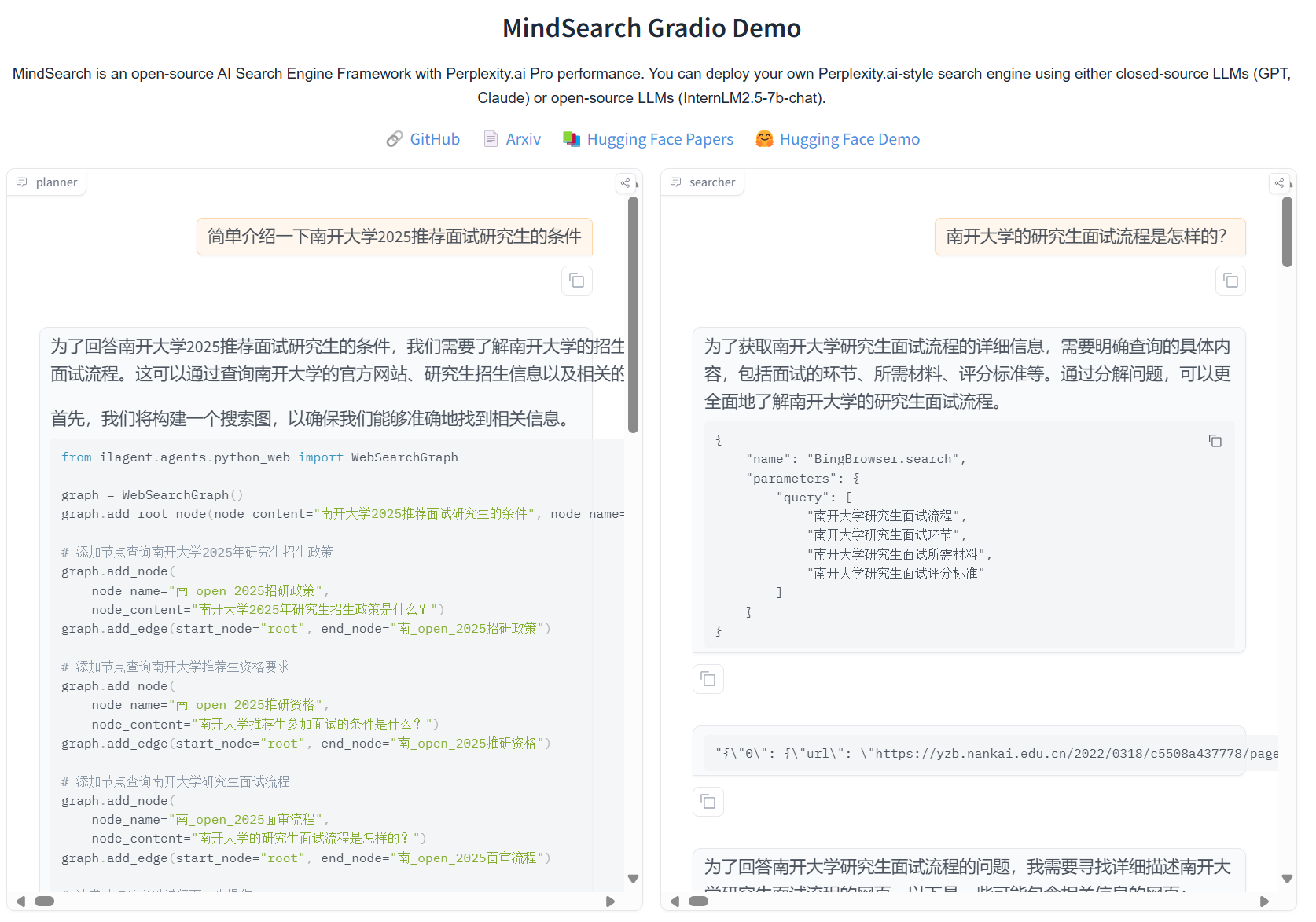
输出
为了回答南开大学2025推荐面试研究生的条件,我们需要了解南开大学的招生政策、推荐生资格要求以及面试流程。以下是对南开大学2025年研究生招生政策的详细介绍:
1. 推免生政策南开大学积极接收推荐免试研究生(推免生),并提供了详细的网上报名流程和申请条件。推免生需登录教育部推免服务系统完成志愿申报、查看复试通知和待录取通知等流程[[1]][[2]]。具体申请条件包括获得本科所在高校推荐免试研究生资格的2025年应届毕业生,外语水平需符合一定标准,如全国大学英语六级成绩425分及以上或TOEFL成绩90分及以上等[[6]][[7]]。
2. 专业范围及条件南开大学各学院对接收推荐免试研究生的专业范围及条件进行了明确规定。例如,社会学院所有专业均可接收本科所属学科专业的学生,且要求通过全国大学英语六级考试或达到其他相应的外语水平标准[[7]]。历史学院则要求申请人具备一定的外语水平和学术能力[[6]]。
3. 奖学金与助学金南开大学为推免研究生提供优厚的奖学金和助学金支持。具体信息以学校最新文件为准[[5]]。
4. 报名时间与截止日期南开大学的网上报名时间为10月8日至10月25日,每天9:00-22:00;预报名时间为9月24日至9月27日,每天9:00-22:00;初试时间为12月23日至24日(每天上午8:30——11:30,下午14:00——17:00)[[12]]。
5. 其他注意事项考生在填写信息时需确保信息的真实性和准确性;提交的材料必须按照指定格式整理并发送至指定邮箱;未按要求提交材料的申请将不被受理[[6]][[7]][[2]]。
综上所述,南开大学的2025年研究生招生政策涵盖了推免生的详细申请流程、专业的广泛覆盖、优厚的奖学金支持以及明确的报名时间和截止日期等信息点。这些政策和规定旨在吸引优秀的学生加入南开大学的研究生队伍中来提升学校的整体科研实力和社会影响力[[1]][[2]][[5]][[6]][[7]].总结
搜索 规划 总结 好好好
Comments