书生大模型实战营-L1-InternLM + LlamaIndex RAG 实践
本节任务要点
- 任务要求:基于 LlamaIndex 构建自己的 RAG 知识库,寻找一个问题 A 在使用 LlamaIndex 之前InternLM2-Chat-1.8B模型不会回答,借助 LlamaIndex 后 InternLM2-Chat-1.8B 模型具备回答 A 的能力,截图保存。
实践流程
新开一个30% A100机器 Cuda11.7-conda 镜像 不要选错/用之前的那个!!!
# 安装新环境conda create -n llamaindex python=3.10conda activate llamaindex
conda install pytorch==2.0.1 torchvision==0.15.2 torchaudio==2.0.2 pytorch-cuda=11.7 -c pytorch -c nvidia
pip install einops==0.7.0 protobuf==5.26.1
pip install llama-index==0.10.38pip install llama-index-llms-huggingface==0.2.0pip install "transformers[torch]==4.41.1"pip install "huggingface_hub[inference]==0.23.1"pip install huggingface_hub==0.23.1pip install sentence-transformers==2.7.0pip install sentencepiece==0.2.0下载 Sentence Transformer 模型
# 不使用download_hf.py,直接使用命令行
export HF_ENDPOINT=https://hf-mirror.comhuggingface-cli download --resume-download sentence-transformers/paraphrase-multilingual-MiniLM-L12-v2 --local-dir /root/project/rag/model/sentence-transformer
# 下载 NLTK 相关资源cd /root/project/raggit clone https://gitee.com/yzy0612/nltk_data.git --branch gh-pagescd nltk_datamv packages/* ./cd tokenizersunzip punkt.zipcd ../taggersunzip averaged_perceptron_tagger.zipInternLM2 1.8B 配置
# 运行以下指令,把 InternLM2 1.8B 软连接出来, 天才cd /root/project/rag/modelln -s /root/share/new_models/Shanghai_AI_Laboratory/internlm2-chat-1_8b/ ./
# 创建llamaindex_demo/llamaindex_internlm.py
from llama_index.llms.huggingface import HuggingFaceLLMfrom llama_index.core.llms import ChatMessage
llm = HuggingFaceLLM( model_name="/root/project/rag/model/internlm2-chat-1_8b", tokenizer_name="/root/project/rag/model/internlm2-chat-1_8b", model_kwargs={"trust_remote_code":True}, tokenizer_kwargs={"trust_remote_code":True})
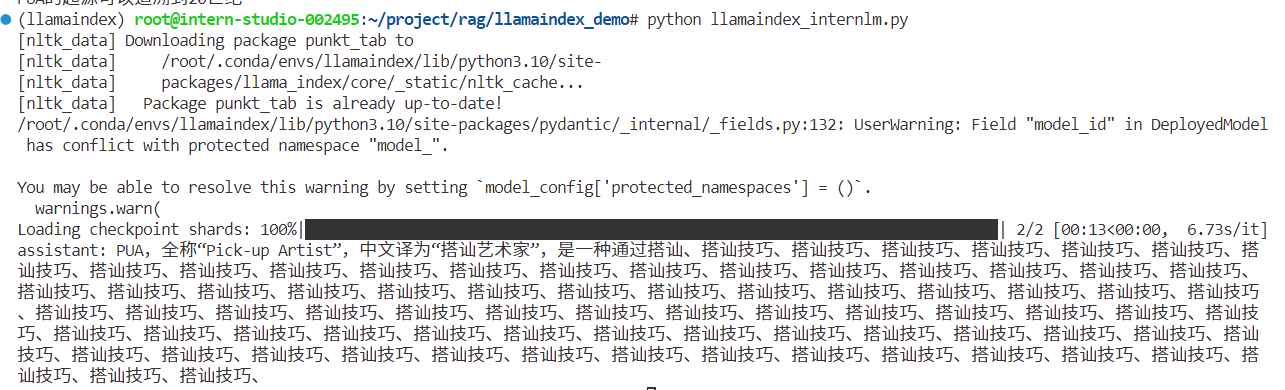
rsp = llm.chat(messages=[ChatMessage(content="什么是PUA?")])print(rsp)
# 运行程序cd /root/project/rag/llamaindex_demopython llamaindex_internlm.py虽然懂一点但不全面,而且停不下来了这哥们
安装 LlamaIndex RAG
pip install llama-index-embeddings-huggingface==0.2.0 llama-index-embeddings-instructor==0.1.3
# xtuner 知识库 (后面数据收集部分,换了别的)cd ~/llamaindex_demomkdir datacd datagit clone https://github.com/InternLM/xtuner.gitmv xtuner/README_zh-CN.md ./编辑 llamaindex_demo/llamaindex_RAG.py
from llama_index.core import VectorStoreIndex, SimpleDirectoryReader, Settings
from llama_index.embeddings.huggingface import HuggingFaceEmbeddingfrom llama_index.llms.huggingface import HuggingFaceLLM
#初始化一个HuggingFaceEmbedding对象,用于将文本转换为向量表示embed_model = HuggingFaceEmbedding(#指定了一个预训练的sentence-transformer模型的路径 model_name="/root/project/rag/model/sentence-transformer")#将创建的嵌入模型赋值给全局设置的embed_model属性,#这样在后续的索引构建过程中就会使用这个模型。Settings.embed_model = embed_model
llm = HuggingFaceLLM( model_name="/root/project/rag/model/internlm2-chat-1_8b", tokenizer_name="/root/project/rag/model/internlm2-chat-1_8b", model_kwargs={"trust_remote_code":True}, tokenizer_kwargs={"trust_remote_code":True})#设置全局的llm属性,这样在索引查询时会使用这个模型。Settings.llm = llm
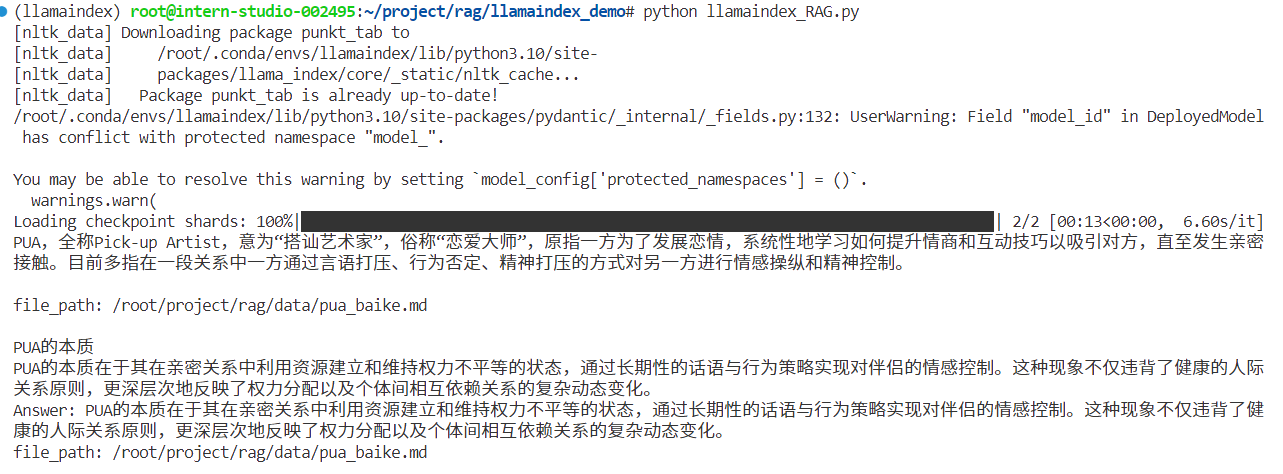
#从指定目录读取所有文档,并加载数据到内存中documents = SimpleDirectoryReader("/root/llamaindex_demo/data").load_data()#创建一个VectorStoreIndex,并使用之前加载的文档来构建索引。# 此索引将文档转换为向量,并存储这些向量以便于快速检索。index = VectorStoreIndex.from_documents(documents)# 创建一个查询引擎,这个引擎可以接收查询并返回相关文档的响应。query_engine = index.as_query_engine()response = query_engine.query("啥是PUA?")
print(response)执行结果
cd /root/project/rag/llamaindex_demopython llamaindex_RAG.py这里找到了和PUA定义基本概念相关的内容切片,内容比较全面
LlamaIndex web
pip install streamlit==1.36.0编辑 llamaindex_demo/app.py
import streamlit as stfrom llama_index.core import VectorStoreIndex, SimpleDirectoryReader, Settingsfrom llama_index.embeddings.huggingface import HuggingFaceEmbeddingfrom llama_index.llms.huggingface import HuggingFaceLLM
st.set_page_config(page_title="llama_index_demo", page_icon="🦜🔗")st.title("llama_index_demo")
# 初始化模型@st.cache_resourcedef init_models(): embed_model = HuggingFaceEmbedding( model_name="/root/project/rag/model/sentence-transformer" ) Settings.embed_model = embed_model
llm = HuggingFaceLLM( model_name="/root/project/rag/model/internlm2-chat-1_8b", tokenizer_name="/root/project/rag/model/internlm2-chat-1_8b", model_kwargs={"trust_remote_code": True}, tokenizer_kwargs={"trust_remote_code": True} ) Settings.llm = llm
documents = SimpleDirectoryReader("/root/project/rag/data").load_data() index = VectorStoreIndex.from_documents(documents) query_engine = index.as_query_engine()
return query_engine
# 检查是否需要初始化模型if 'query_engine' not in st.session_state: st.session_state['query_engine'] = init_models()
def greet2(question): response = st.session_state['query_engine'].query(question) return response
# Store LLM generated responsesif "messages" not in st.session_state.keys(): st.session_state.messages = [{"role": "assistant", "content": "你好,我是你的助手,有什么我可以帮助你的吗?"}]
# Display or clear chat messagesfor message in st.session_state.messages: with st.chat_message(message["role"]): st.write(message["content"])
def clear_chat_history(): st.session_state.messages = [{"role": "assistant", "content": "你好,我是你的助手,有什么我可以帮助你的吗?"}]
st.sidebar.button('Clear Chat History', on_click=clear_chat_history)
# Function for generating LLaMA2 responsedef generate_llama_index_response(prompt_input): return greet2(prompt_input)
# User-provided promptif prompt := st.chat_input(): st.session_state.messages.append({"role": "user", "content": prompt}) with st.chat_message("user"): st.write(prompt)
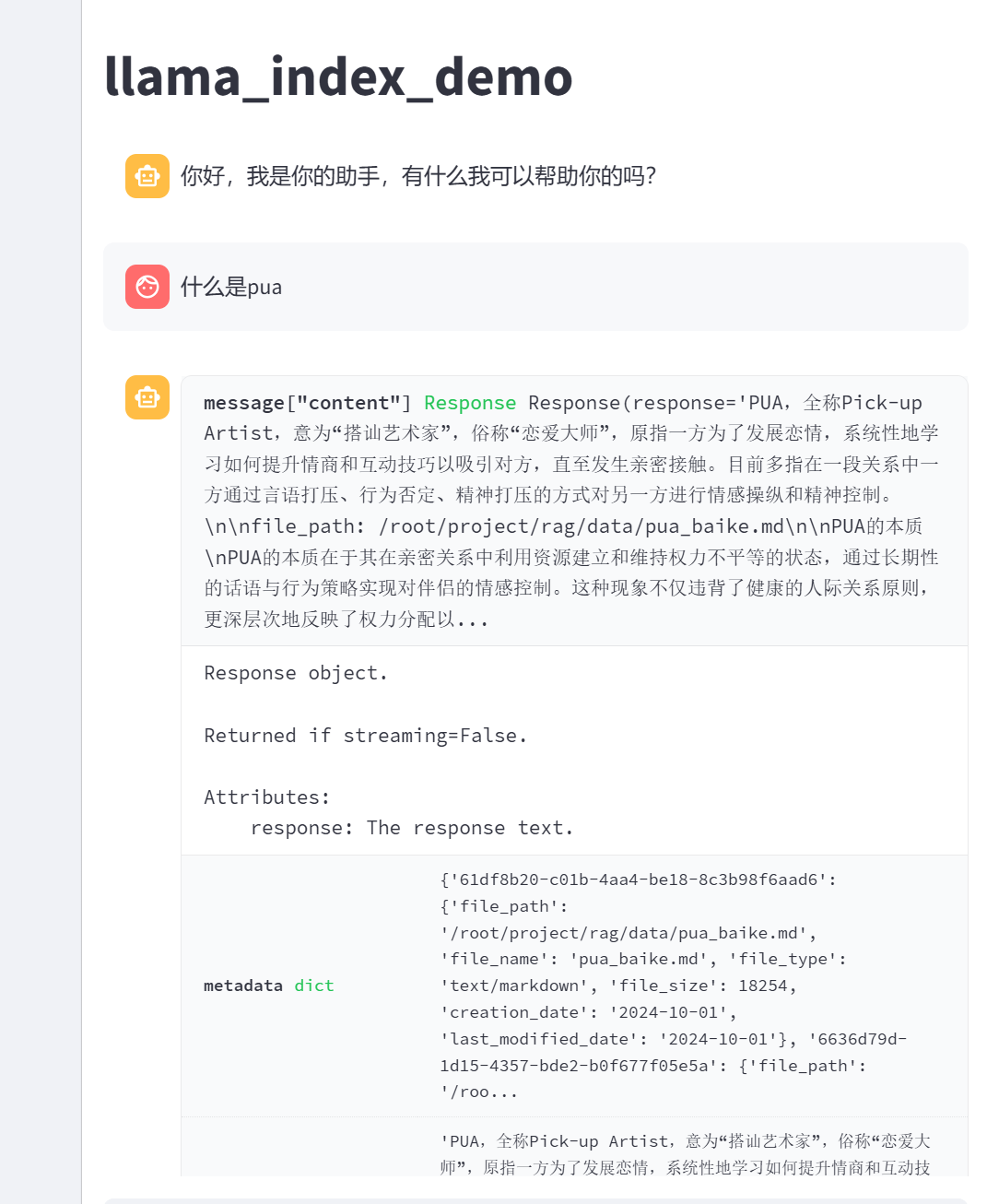
# Gegenerate_llama_index_response last message is not from assistantif st.session_state.messages[-1]["role"] != "assistant": with st.chat_message("assistant"): with st.spinner("Thinking..."): response = generate_llama_index_response(prompt) placeholder = st.empty() placeholder.markdown(response) message = {"role": "assistant", "content": response} st.session_state.messages.append(message)运行
streamlit run app.py执行结果
数据收集
收集关于PUA定义、危害、特点、不同场景、解决方案等相关资料
来源:百度百科:https://baike.baidu.com/item/PUA/5999185
总结
-
学会使用hf镜像下载文件,https://hf-mirror.com/
-
SimpleDirectoryReader 默认会尝试读取它找到的所有文件,将它们作为文本处理。它显式支持以下文件类型,这些类型会根据文件扩展名自动检测:.csv .docx .epub .ipynb .jpeg .jpg .md .mp3 .mp4 .pdf .png .ppt等
-
数据质量重要,学会洗数据
Comments